 66795daf5e
|
7 years ago | |
|---|---|---|
| .. | ||
| WrappedPlugin | 7 years ago | |
| .travis.yml | 7 years ago | |
| CONTRIBUTING.md | 7 years ago | |
| LICENSE | 7 years ago | |
| README.md | 7 years ago | |
| colours.js | 7 years ago | |
| index.js | 7 years ago | |
| jest.config.js | 7 years ago | |
| lerna.json | 7 years ago | |
| loader.js | 7 years ago | |
| logo.svg | 7 years ago | |
| migration.md | 7 years ago | |
| neutrino.js | 7 years ago | |
| output.js | 7 years ago | |
| preview.png | 7 years ago | |
| utils.js | 7 years ago | |
| utils.test.js | 7 years ago | |


README.md

Speed Measure Plugin
(for webpack)



The first step to optimising your webpack build speed, is to know where to focus your attention.
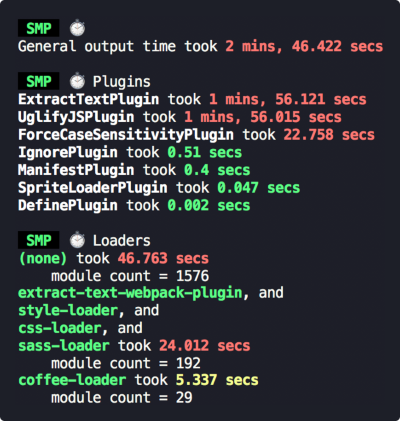
This plugin measures your webpack build speed, giving an output like this:
Install
npm install --save-dev speed-measure-webpack-plugin
or
yarn add -D speed-measure-webpack-plugin
Requirements
SMP requires at least Node v6. But otherwise, accepts all webpack versions (1, 2, 3, and 4).
Usage
Change your webpack config from
const webpackConfig = {
  plugins: [
    new MyPlugin(),
    new MyOtherPlugin()
  ]
}
to
const SpeedMeasurePlugin = require("speed-measure-webpack-plugin");

const smp = new SpeedMeasurePlugin();

const webpackConfig = smp.wrap({
  plugins: [
    new MyPlugin(),
    new MyOtherPlugin()
  ]
});
and you're done! SMP will now be printing timing output to the console by default.
Check out the examples folder for some more examples.
Options
Pass these into the constructor, as an object:
const smp = new SpeedMeasurePlugin(options);
options.disable
Type: Boolean
Default: false
If truthy, this plugin does nothing at all.
{ disable: !process.env.MEASURE } allows opt-in measurements with MEASURE=true npm run build.
options.outputFormat
Type: String|Function
Default: "human"
Determines in what format this plugin prints its measurements
"json"- produces a JSON blob"human"- produces a human readable output"humanVerbose"- produces a more verbose version of the human readable output- If a function, it will call the function with the JSON blob, and output the response
options.outputTarget
Type: String|Function
Default: console.log
- If a string, it specifies the path to a file to output to.
- If a function, it will call the function with the output as the first parameter
options.pluginNames
Type: Object
Default: {}
By default, SMP derives plugin names through plugin.constructor.name. For some
plugins this doesn't work (or you may want to override this default). This option
takes an object of pluginName: PluginConstructor, e.g.
const uglify = new UglifyJSPlugin();
const smp = new SpeedMeasurePlugin({
  pluginNames: {
    customUglifyName: uglify
  }
});

const webpackConfig = smp.wrap({
  plugins: [
    uglify
  ]
});
options.granularLoaderData (experimental)
Type: Boolean
Default: false
By default, SMP measures loaders in groups. If truthy, this plugin will give per-loader timing information.
This flag is experimental. Some loaders will have inaccurate results:
- loaders using separate processes (e.g.
thread-loader) - loaders emitting file output (e.g.
file-loader)
We will find solutions to these issues before removing the (experimental) flag on this option.
Contributing
Contributors are welcome! 😊
Please check out the CONTRIBUTING.md.
Migrating
SMP follows semver. If upgrading a major version, you can consult the migration guide.